Introducing PVcase Concept: from solar site feasibility to preliminary design


What is PVcase Concept?
For: Project developers and non-engineering stakeholders assessing solar opportunities.
What it does: Tests site feasibility through preliminary layouts, capacity estimates, yield projections, and directional economics.
The outcome: Qualify sites and identify viable designs earlier, reserving engineering resources for projects worth advancing.
There's a big difference between a promising solar site and one that can support a viable project. Bridging that gap requires solar developers to make early design assumptions about land use, installed capacity, energy generation, and project economics.
But without a reliable way to test those assumptions, developers risk advancing unsuitable opportunities or committing engineering resources before a project has been properly qualified.
PVcase Concept helps developers mitigate these risks. Our new preliminary solar design platform helps developers assess site feasibility, explore design alternatives, and evaluate project viability before committing to detailed engineering.
Table of contents
- 1. Preliminary solar design built around better feasibility decisions
- 2. Setting the site boundaries
- 3. Establishing site context and buildable area
- 4. How PVcase Prospect accelerates the first feasibility steps
- 5. Testing design and capacity assumptions
- 6. Generating preliminary configurations with PVcase Concept
- 7. Comparing technical and financial outcomes
- 8. Selecting the configuration to advance
- 9. Configuring the project report for stakeholders
- 10. From solar feasibility on PVcase Concept to detailed design on PVcase Ground Mount
- 11. Qualify sites before committing engineering resources
Preliminary solar design built around better feasibility decisions
PVcase Concept brings preliminary design and feasibility analysis into a single workflow. Developers can define buildable land, generate alternative solar layouts, and compare their technical and economic performance to understand what a site could realistically support.
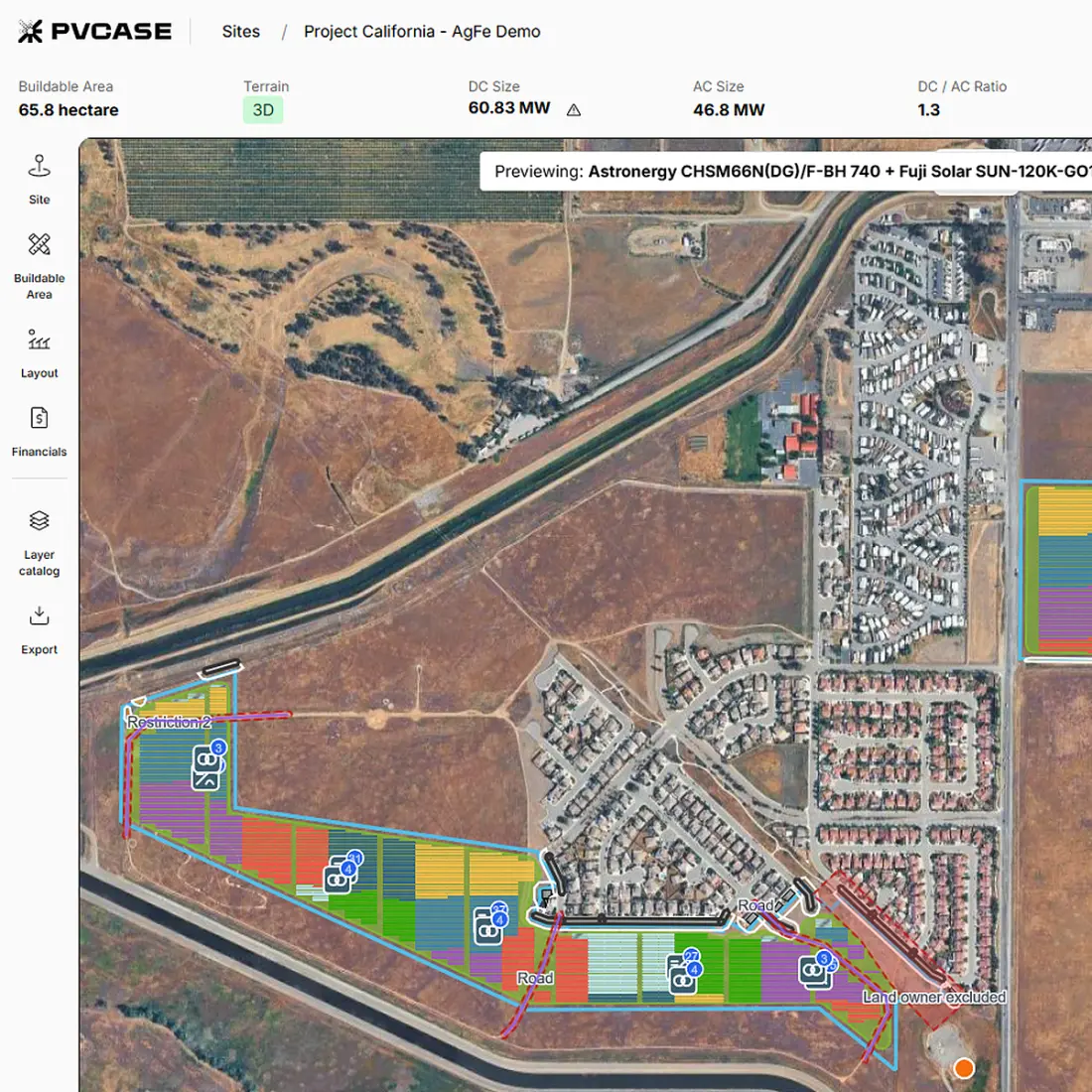
But the value goes beyond generating layouts. PVcase Concept helps developers determine which opportunities deserve to advance, using preliminary design results to support more informed go/no-go decisions.
For teams managing multiple opportunities, this means evaluating project potential without commissioning detailed engineering for every promising site.
Let's look at how the workflow works in practice:
Setting the site boundaries
Quick take
Draw or import site boundaries, review individual polygons, and define the land available for the initial solar feasibility assessment.
The first step in PVcase Concept is to define the land under evaluation. You can create the site boundary in two ways:
Draw directly on the map to outline the area under consideration.
Import a KML or KMZ file containing an existing boundary, including files with multiple polygons representing different parts of the site.
When importing a file, you can review its geometry, edit individual shapes, remove irrelevant polygons, and identify which polygon represents the overall site.
Once created, that outer boundary determines the project's working extent. You can continue drawing, editing, and classifying polygons within this area as new information becomes available.
This gives the feasibility assessment a defined geographic starting point without requiring a detailed GIS model.
Establishing site context and buildable area
Quick take
Add relevant site constraints, distinguish buildable from excluded land, and determine where preliminary solar layouts can realistically fit on-site.
With the project boundary defined, the next task is to identify which portions of the site can support development.
PVcase Concept lets you work with geographic information inside the project area, including imported vector data representing relevant site features and constraints. These can include polygons, lines, and points, depending on the available source files.
You can then use editable polygons to distinguish between:
Buildable areas: Land available for preliminary layout generation.
Excluded areas: Portions of the site that should not accommodate equipment.
Other site features: Geometry retained as reference information during evaluation.
Imported geographic features can provide useful context, but importing a feature does not automatically make it a layout exclusion. Users need to distinguish the information they want to retain for reference from the areas that should influence equipment placement.
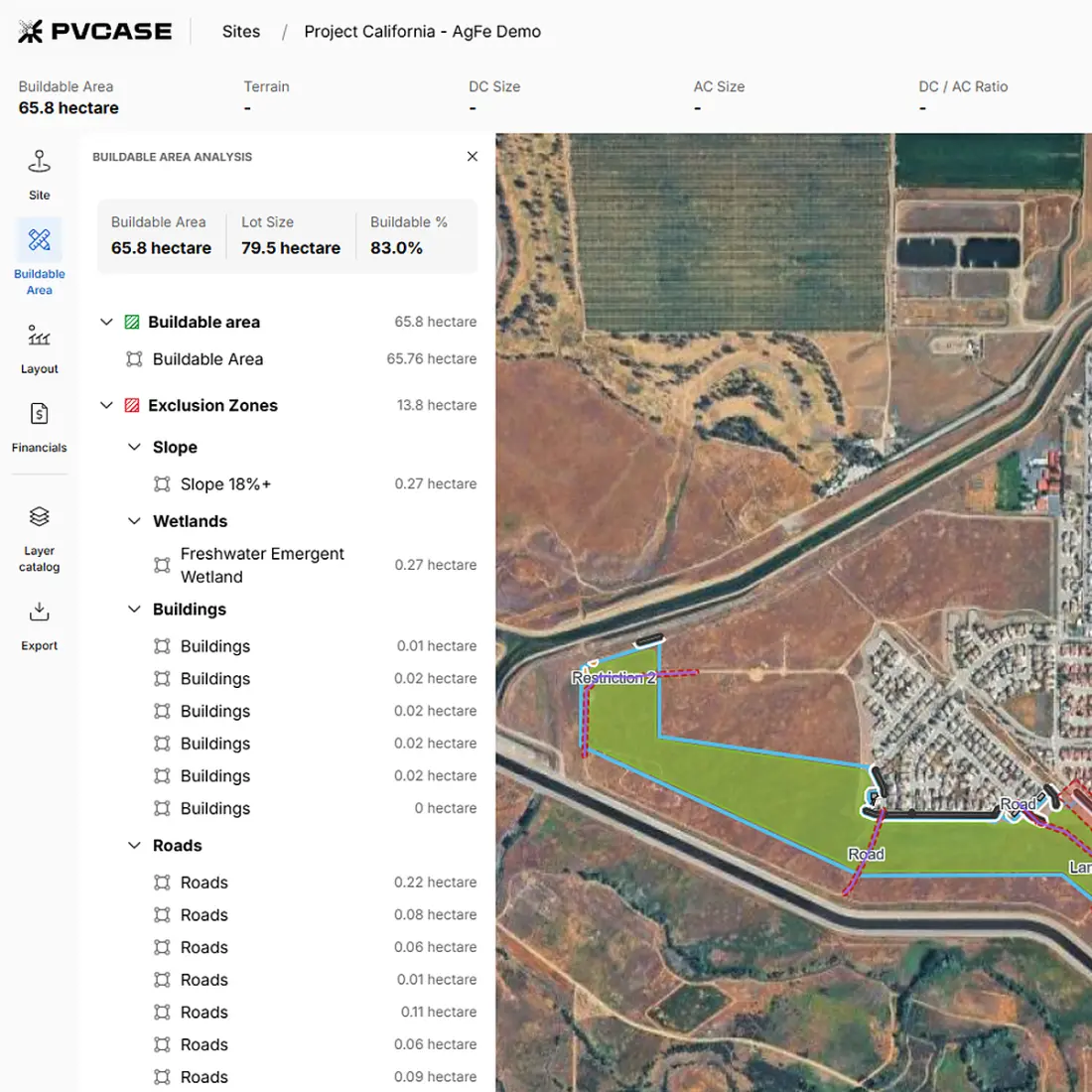
By marking excluded areas, developers determine how much land remains available for solar equipment, including PV modules and their supporting structures. This provides a more realistic basis for estimating the site's potential installed capacity.
Buildable area analysis
For teams with access to PVcase Prospect's data layers, PVcase Concept also supports automated buildable-area analysis.
As in the site selection platform, it allows users to:
Select relevant layers
Define setbacks
Determine how geographic constraints affect the available development area
The resulting buildable area can then be reviewed and edited before generating preliminary layouts.
How PVcase Prospect accelerates the first feasibility steps
Quick take
Carry evaluated site information into preliminary design, reducing repeated setup work while preserving the context behind earlier development decisions.
For developers already using PVcase Prospect, the workflow begins further upstream.
Rather than starting the feasibility model from an empty map, they can import the selected site into PVcase Concept and continue the assessment using available site context.
The connected workflow follows a practical progression:
Evaluate the opportunity in PVcase Prospect. Review the selected site, relevant geographic information, and development constraints.
Open the site in PVcase Concept. Carry the available site boundary and context into the preliminary design environment.
Define the buildable area. Use the buildable-area analysis completed in PVcase Prospect, or perform the analysis in PVcase Concept.
Configure the design assumptions. Set the equipment and project parameters that the preliminary layouts should test.
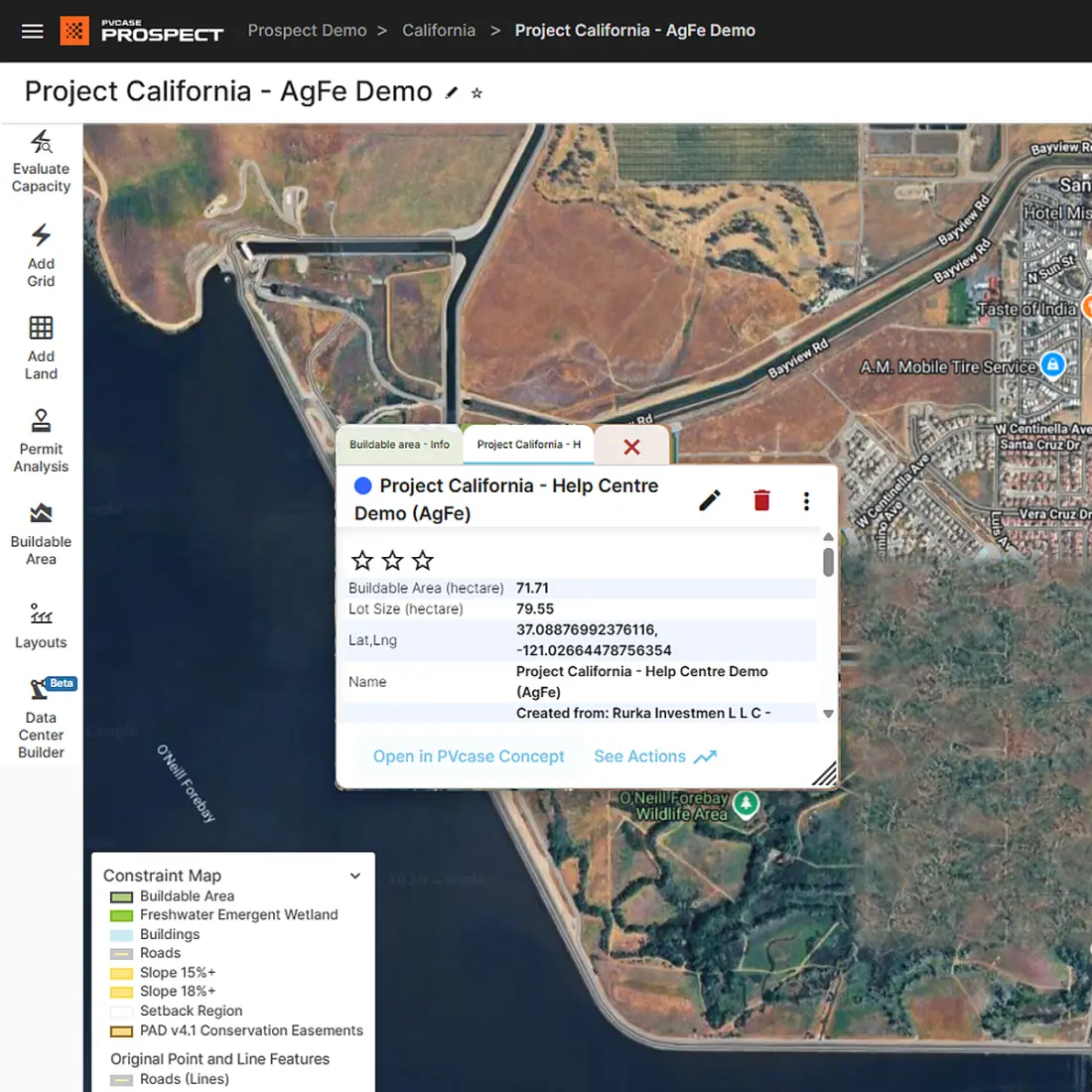
The handoff carries forward the available site information, helping preserve the relationship between why a site was selected and what can be designed within it. This means users can move into layout configuration almost immediately, without the need to manually reconstruct every part of the earlier assessment - a relevant advantage when evaluating multiple sites simultaneously.
Testing design and capacity assumptions
Quick take
Define equipment and capacity parameters before generating layouts, so each alternative tests a meaningful set of project assumptions consistently.
Once the buildable area is defined, developers can specify the parameters used to test the site's potential.
These include equipment selections and configuration parameters such as:
Ground Coverage Ratio (GCR): To test different relationships between occupied land and array spacing.
DC/AC ratio: To explore alternative relationships between installed DC capacity and AC capacity.
Equipment settings: To define the components used when generating the layout (including fixed-tilt or single-axis tracker configurations).
Maximum MW: To introduce a capacity constraint into the assessment.
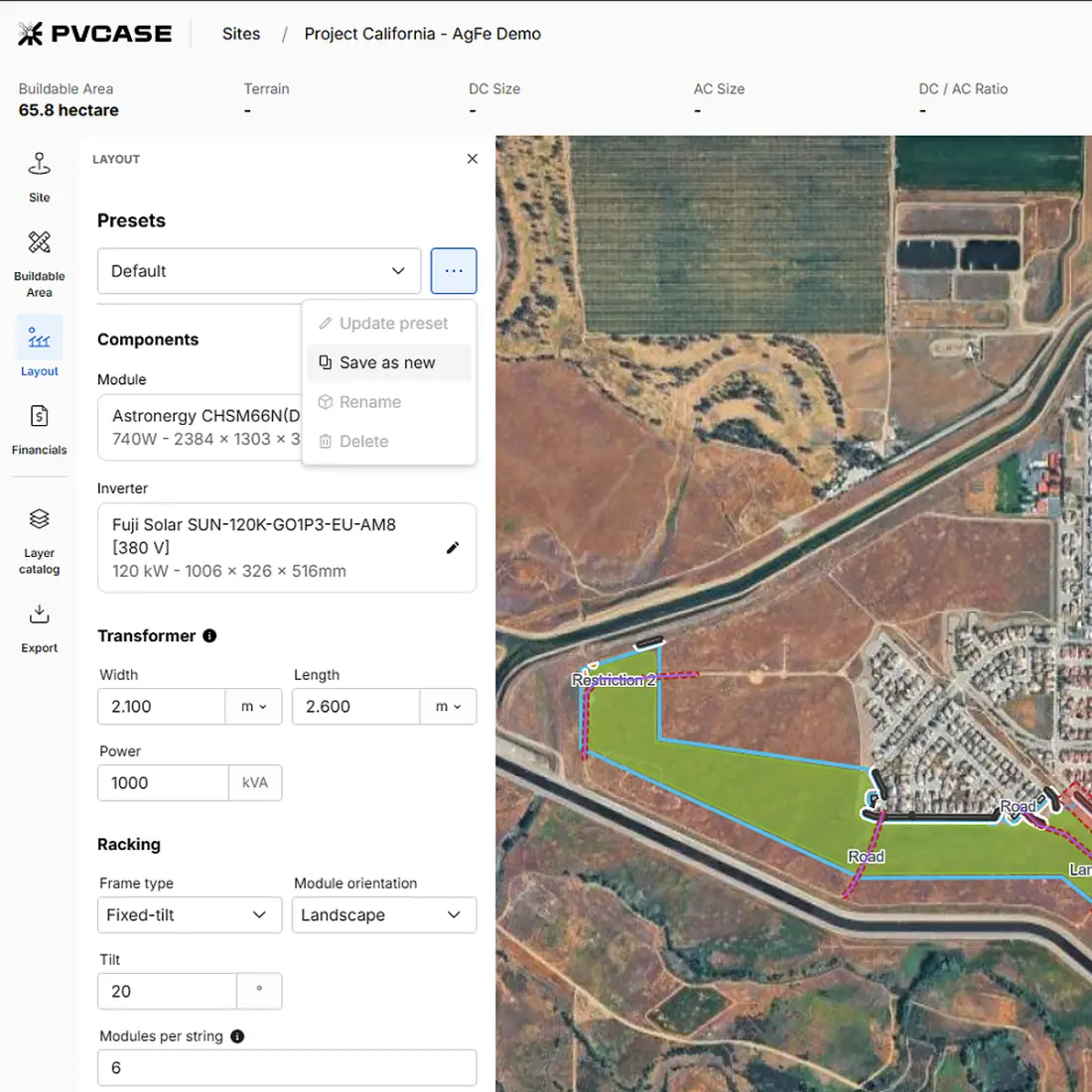
Rather than committing immediately to one design, users can define parameter ranges to examine several possible configurations.
For example, a site might accommodate a relatively dense arrangement, but that does not necessarily make it the preferred option once energy generation and project economics are considered.
Those inputs provide the basis for the preliminary alternatives generated in the next step.
Generating preliminary configurations with PVcase Concept
Quick take
Generate multiple preliminary layouts from defined assumptions, then examine how equipment choices and design parameters affect potential site capacity.
Having specified the selected buildable area and design inputs, PVcase Concept generates preliminary solar configurations automatically, up to 20 layout options in a single assessment. These allow for different combinations of GCR and DC/AC ratios to be tested within the same project.
The resulting alternatives can differ in module arrangement, row spacing, and the relationship between installed DC and AC capacity. Every configuration is associated with preliminary technical outputs that can be examined alongside the layout itself. Preliminary designs can incorporate electrical equipment too, including inverters and transformers, along with the space needed for access and electrical corridors.
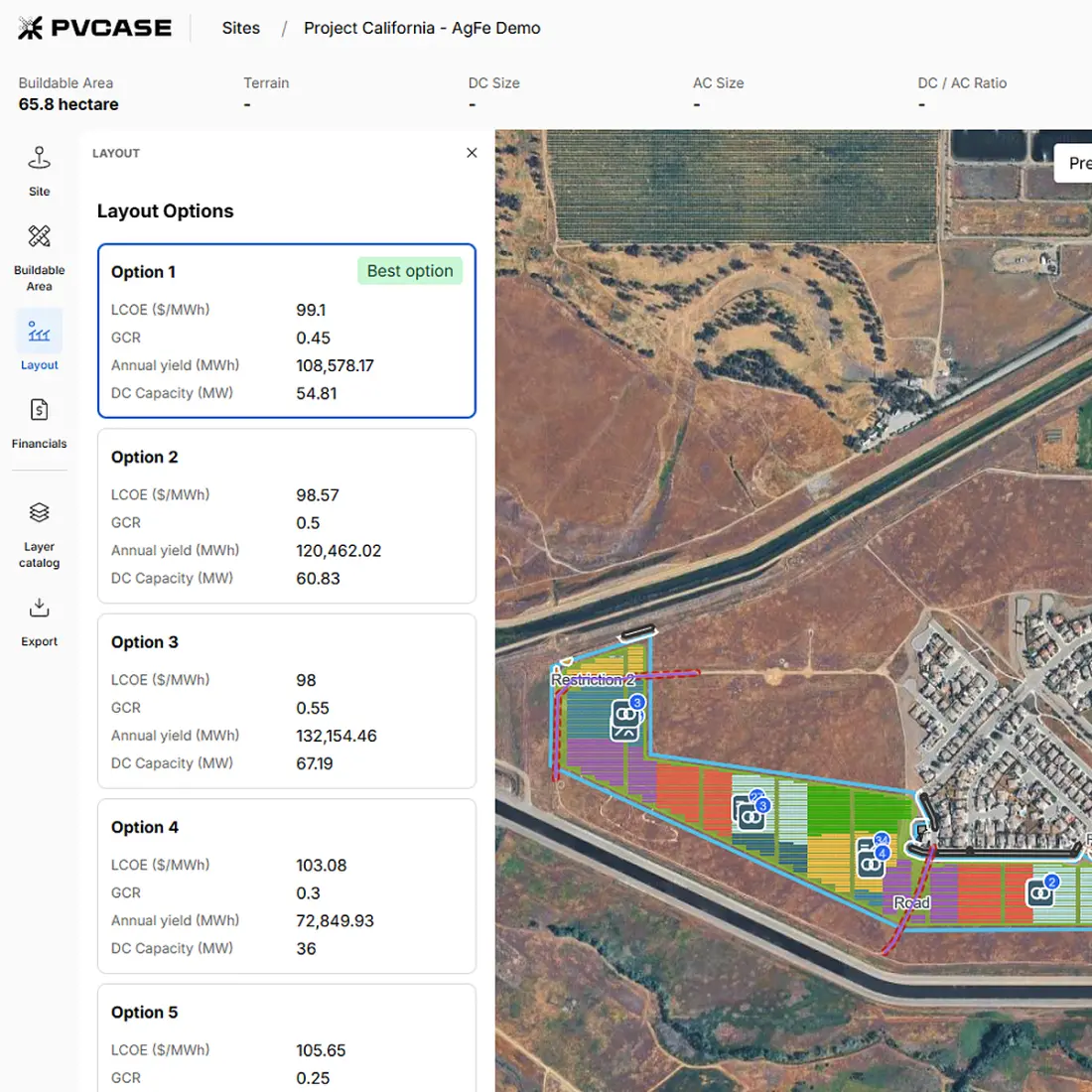
Each result represents a different combination of design decisions that can be evaluated against the project's objectives.
PVcase Concept also supports terrain-aware layout generation, allowing preliminary configurations to account for site slopes rather than assuming uniformly flat land. Developers can inspect the resulting layout and review slope information for individual frames.
Overall, this gives developers a way to investigate questions such as whether a higher-capacity configuration is worth pursuing, or whether another arrangement may offer a more attractive balance between installed capacity and expected output.
Comparing technical and financial outcomes
Quick take
Compare capacity, expected generation, and directional economics across configurations to identify trade-offs before selecting a preferred preliminary solar design.
Once the configurations are generated, the next step is to determine which alternative presents the strongest case for further development.
Estimating energy generation and project economics
PVcase Concept uses QuickYield calculations to estimate energy performance during preliminary design. QuickYield combines layout geometry, module and inverter parameters, and irradiance data to produce an early indication of expected generation.
To evaluate project economics, developers can enter CAPEX and OPEX assumptions, including fixed and variable operating costs. Equipment quantities from the selected design help populate CAPEX inputs, while financial parameters such as project lifetime and discount rate support the calculation of directional LCOE.
These inputs allow developers to compare preliminary configurations using project-specific cost assumptions rather than relying solely on technical performance.
Scenario comparison
PVcase Concept brings the generated scenarios into a comparison view, allowing developers to examine their technical and financial characteristics side by side.
Depending on the available outputs, these include:
| Comparison area | Metrics available for evaluation |
|---|---|
| Design characteristics | Ground coverage ratio, pitch, equipment arrangemen |
| Installed capacity | DC capacity, AC capacity, DC/AC ratio |
| Energy performance | Estimated annual generation, specific yield |
| Directional economics | Estimated levelized cost of energy (LCOE) |
The comparison view also includes a scenario-ranking field, allowing developers to examine the generated alternatives alongside their reported results. Users can sort the results according to their preferred comparison criteria, but this does not change the ranking assigned by the product.
Looking beyond maximum capacity
A layout with greater installed capacity may not necessarily deliver the most attractive economic outcome. Different spacing assumptions can affect energy performance, while changes to the DC/AC ratio can alter the balance between installed equipment and expected generation.
By reviewing the alternatives together, developers can investigate trade-offs such as:
Capacity versus generation: Does additional installed capacity produce a proportionate improvement in expected energy output?
Layout density versus performance: How do different GCR assumptions affect the results?
Technical output versus economics: Which configurations appear most promising when estimated generation and directional LCOE are considered together?
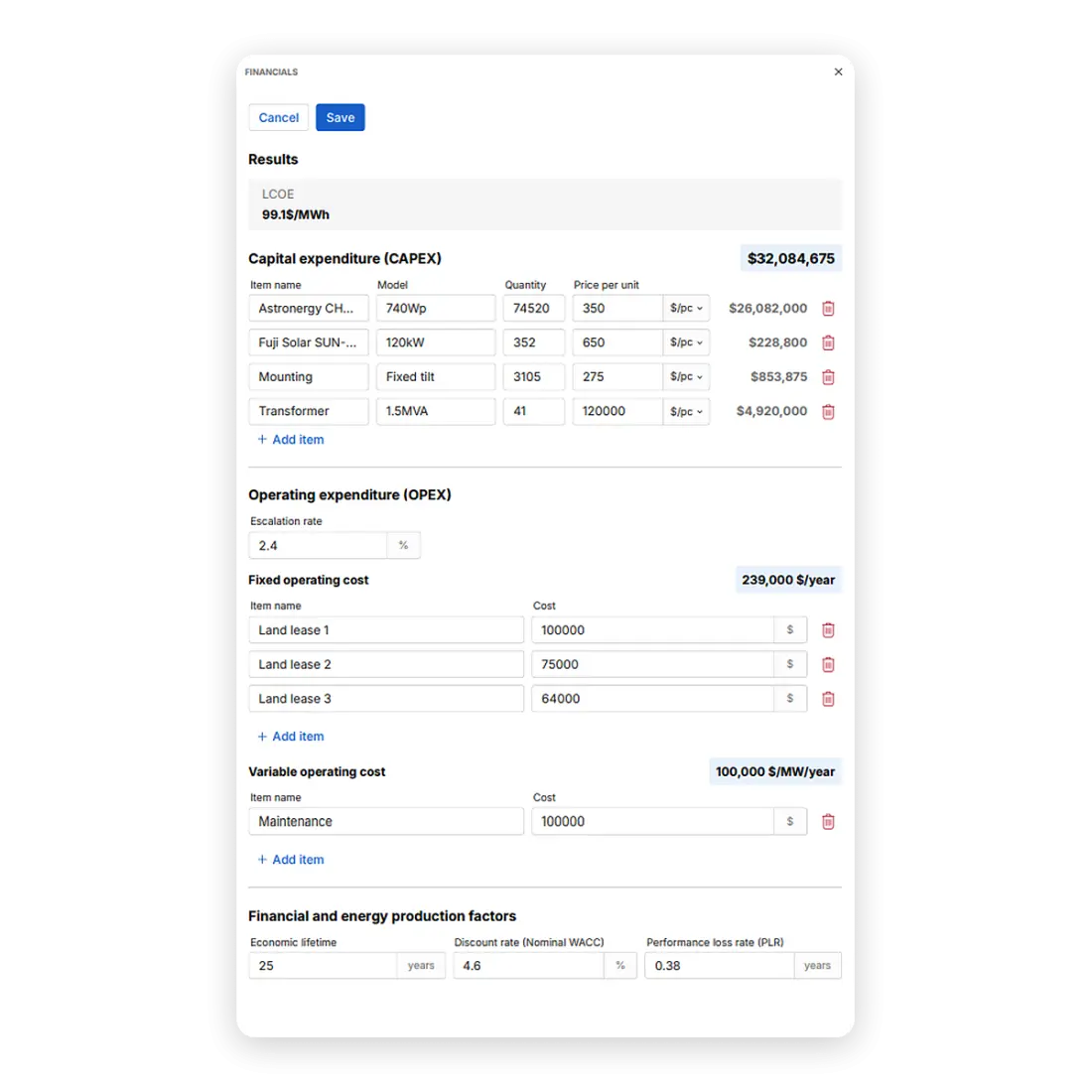
These comparisons help turn a collection of possible layouts into a shortlist of development options.
The economic results should be interpreted at the appropriate level of detail. Directional LCOE is an early comparison metric, not a bankable financial forecast. Likewise, preliminary yield estimates do not replace the higher-fidelity assessments required later in development.
Selecting the configuration to advance
Quick take
Choose the configuration that best supports project priorities and retain a preliminary design to guide the next development decision.
The preferred layout is not necessarily the one with the highest capacity, the greatest estimated generation, or the lowest directional LCOE in isolation.
With PVcase Concept, developers can select a preferred scenario and save it containing the buildable-area analysis, preliminary design, and financial assumptions, all while preserving the alternatives considered during evaluation.
That selection provides a concrete reference for the next stage of evaluation: a preliminary arrangement associated with defined assumptions and expected outcomes.
It also gives the development team something more specific to discuss than an approximate site capacity. The conversation can now focus on a proposed configuration and the reasons for advancing it.
On top of that, development managers can also record a site's development status — including whether it is feasible, on hold, or no longer being pursued — and document why an opportunity was rejected.
Configuring the project report for stakeholders
Quick take
Turn preliminary feasibility results into tailored reports that help different stakeholders review project evidence, priorities, and proposed next steps.
The value of preliminary design depends not only on the quality of the assessment, but also on whether its conclusions can support the next conversation. However, when communicating the findings to different project stakeholders, they rarely need the same level of detail.
A landowner may be most interested in the proposed use of the site. An engineering team may need to understand the configuration and technical assumptions. Investors or commercial decision-makers may focus on capacity, expected generation, and financial indicators.
PVcase Concept addresses these different requirements through a configurable project-reporting workflow.
From selected scenario to project report
After selecting a configuration, developers can access the report export workflow and prepare a PDF using the project information available.
The reporting interface supports several levels of customization:
Audience-oriented report configurations: Choose a starting structure suited to the intended stakeholder.
Modular content: Select which report sections to include.
Section ordering: Arrange the information according to the purpose of the discussion.
Preview: Review the report before exporting.
PDF export: Produce a document that can be shared outside the design environment.
The report can bring together relevant project information, including site and parcel context, available development constraints, preliminary layout results, and technical or financial outputs. The exact content depends on the information available for the project and the report configuration selected.
One project, different conversations
Additionally, developers can use the selected configuration as a starting point and adjust the included sections. This allows them to prepare reports with different levels of technical and commercial detail from the same project assessment.
Consider how the reporting priorities might change depending on the recipient:
For an engineering review, the report can emphasize the selected layout, equipment assumptions, capacity, and the technical information needed to evaluate the proposed direction.
For an investment discussion, the emphasis may shift toward expected generation, directional economics, and the evidence supporting further development expenditure.
For a landowner offer, the most relevant material may be the site boundary, proposed land use, and preliminary arrangement.
By tailoring reports to each audience, developers can address different stakeholder priorities without losing sight of the overall project assessment. As each stakeholder receives the most relevant information, it makes it easier to identify concerns, resolve outstanding questions, and determine what needs further investigation.
The resulting targeted discussions enable developers to bring the different perspectives together into a clearer assessment of project viability — and reach informed decisions.
From solar feasibility on PVcase Concept to detailed design on PVcase Ground Mount
Quick take
Export the selected preliminary design as a DXF file to provide a CAD-based starting point for subsequent detailed engineering.
Once stakeholders have reviewed the relevant reports and the project is approved to advance, the selected preliminary configuration can move into detailed engineering.
PVcase Concept exports preliminary designs in DXF format, including module frames, strings, electrical equipment, corridors, and site restrictions. Engineering teams can import this information into our solar farm design software PVcase Ground Mount, reducing the need to recreate the preliminary layout manually.
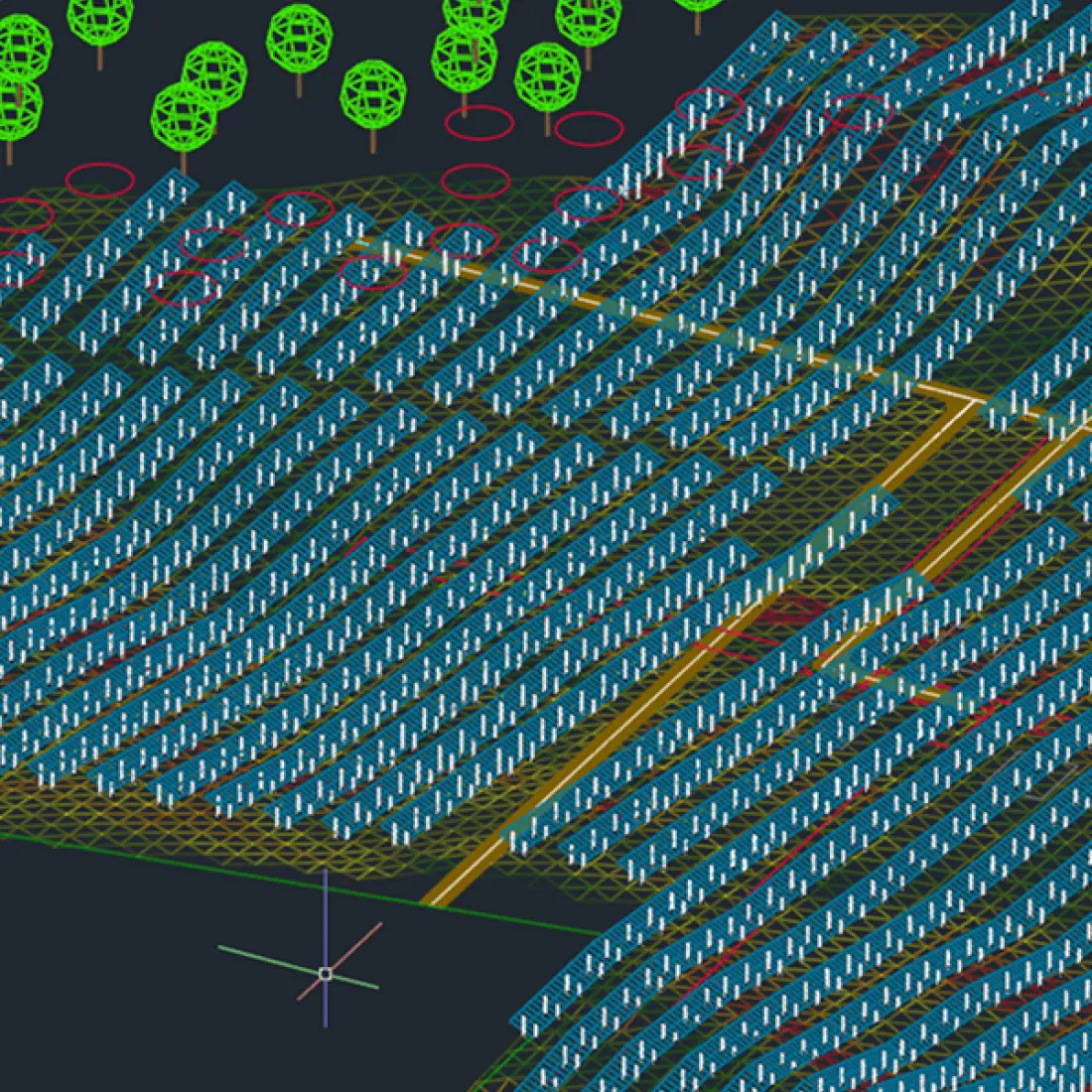
Combining PVcase Prospect, PVcase Concept, and PVcase Ground Mount creates a connected development workflow spanning site selection, early design, and detailed engineering. Project information can move between these stages seamlessly, helping teams maintain continuity and advance viable opportunities more efficiently.
Qualify sites before committing engineering resources
Not every promising site will become a viable project. The challenge is identifying which opportunities deserve further investment without committing engineering resources to every possibility.
PVcase Concept gives developers the evidence to make that distinction: assess buildable land, test preliminary configurations, compare technical and economic outcomes, and communicate the results to stakeholders.


Don’t over-engineer a maybe
Advance the opportunities that justify detailed engineering. Rule out those that don't.