Webinars
One-stop-software for scalable, efficient, and accurate PV project development
December 10, 2024

EXECUTIVE SUMMARY
General-purpose software lacks the solar-specific context required by complex development workflows. This forces teams to rely on manual workarounds across design, engineering, financial analysis, data sharing, and release management, increasing the risk of errors, outdated information, delays, and costs.
Today, most solar projects are still developed using non-specialized software.
The reason is simple: generic office tools like Excel spreadsheets, PDFs, and standard file repositories are cheaper upfront. However, their limitations create additional costs and inefficiencies later in development.
These tools are designed to work across industries, not around the specific objects, constraints, calculations, and approval processes involved in the solar project development process. Since they lack this context, teams have to find manual workarounds, which lead to errors, outdated information, rework, and project delays.
Successfully navigating the frictions of solar development therefore requires understanding where general-purpose tools are sufficient—and where solar-specific software becomes necessary.
QUICK TAKE
Static markup tools lack solar design context, forcing engineers to interpret feedback and increasing ambiguity, errors, and repeated review cycles.
Not every stakeholder involved in a solar project needs access to specialized CAD software. But when project managers, commercial teams, or executives need to review a layout, the alternative is often surprisingly basic: export the design as a PDF or screenshot, open it in a generic markup tool such as Bluebeam or even MS Paint, and draw over the static image.
These tools can highlight an area or communicate a general idea. But a hand-drawn line, arrow, or text box saying “realign this section” may not accurately define:
Where the requested change starts and ends
Which strings or equipment it affects
How the change should interact with surrounding design constraints
The fundamental problem is that the markup does not understand the solar design behind the image.
A tracker row, inverter, road, fence, or parcel boundary cannot be treated as an actual design object. Reviewers must instead refer to them approximately through circles, arrows, highlights, and written instructions.
Generic markup tools also lack awareness of engineering constraints. A proposed access road, exclusion zone, or array adjustment might look reasonable on a static image while conflicting with:
Setbacks or parcel boundaries
Terrain conditions
Drainage requirements
Other engineering constraints
The markup application cannot identify these conflicts or warn the reviewer about their consequences.
Engineers must therefore interpret the feedback and translate it back into the actual design environment. Every manual interpretation creates another opportunity for a requested change to be misunderstood, applied incorrectly, or sent through an additional review round.
The underlying access problem—and the communication bottlenecks it creates between CAD and non-CAD stakeholders—is explored in more detail in our guides to solar project software fragmentation and team collaboration in solar development.
The broader issue is simpler: generic markup applications can display a solar design, but they cannot understand it.
QUICK TAKE
Custom spreadsheets fill gaps in generic design software, but disconnected calculations, manual data transfers, and formula errors increase engineering risks.
General-purpose design software cannot account for every variable that affects a solar project. To fill these gaps, engineering teams often export project data from CAD and build their own Excel workbooks to perform calculations the original software cannot handle.
Cable sizing is one example. Generic CAD tools can rely on fixed calculation assumptions that fail to reflect real site conditions. Engineers may need to account separately for factors such as:
Soil thermal resistivity across different terrain conditions
Thermal buildup from cable grouping inside underground trenches
Seasonal temperature variations
Local regulations and engineering standards
Internal installation requirements
When these parameters cannot be incorporated into the design environment, engineers have to calculate values such as ampacity and voltage drop separately in Excel.
The spreadsheet solves one problem, but creates another: critical engineering calculations become disconnected from the design they are supposed to validate.
Every time the layout changes, engineers may need to export a new bill of materials (BOM), update the relevant workbook, and verify that its inputs still correspond to the latest design. A missed update can leave calculations based on obsolete project data, allowing incorrect assumptions or unexpected costs to remain unnoticed until later in development.
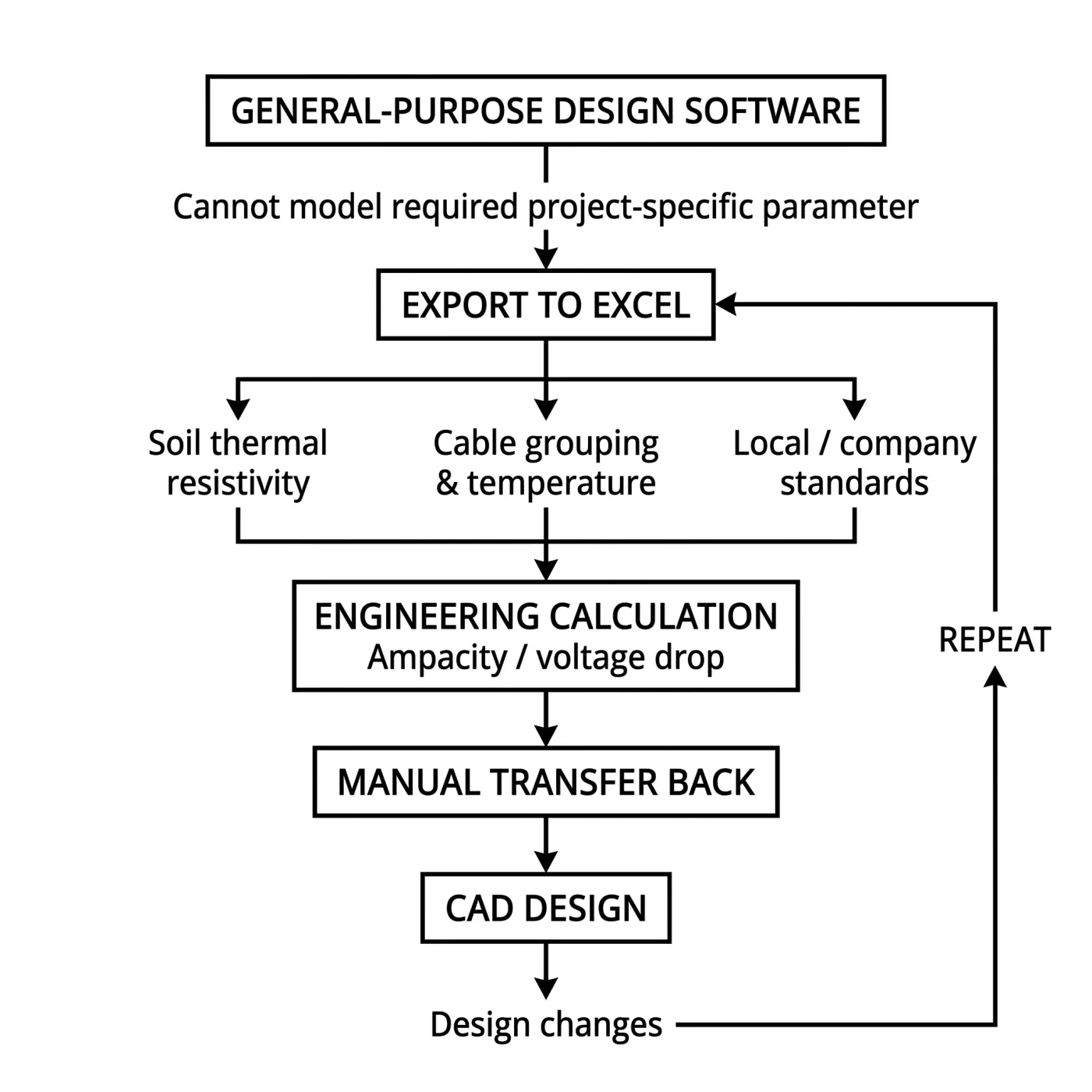
Repeated across project iterations, these manual handoffs can contribute to engineering rework that extends well beyond the original calculation.
Custom spreadsheets also introduce risks of their own:
Formula errors: Complex engineering workbooks can contain large numbers of formulas, lookups, references, and sometimes macros. An overwritten formula, broken reference, incorrect copy-paste, or unit conversion error can alter the result without necessarily producing an obvious warning.
Limited input validation: Excel understands the value entered into a cell, but not necessarily its engineering meaning. Unless teams build and maintain their own validation rules, the spreadsheet may not recognize an incorrect unit, unrealistic value, or incompatible input.
Manual data handling: Moving BOMs, component specifications, and calculation inputs between CAD and Excel creates additional opportunities for information to be entered incorrectly, omitted, or associated with the wrong project iteration.
These limitations extend beyond electrical calculations. When native civil tools cannot accurately model project-specific terrain conditions, engineers may build proprietary spreadsheet calculations for parameters such as cut-only grading on rocky sites. Component administration can require similar workarounds, with panel and inverter specifications being manually maintained when general design applications lack a centralized, validated component database.
None of these workarounds necessarily fails on its own. In fact, a well-built engineering spreadsheet can be extremely sophisticated. The risk comes from relying on manually maintained files to bridge capabilities that the underlying software was never designed to provide.
QUICK TAKE
Generic spreadsheets and file exports disconnect design, yield, and financial decisions, creating stale analyses, manual translation, and repeated validation cycles.
Optimizing a solar layout is not only an engineering exercise. A design that maximizes energy production still has to meet the financial requirements that determine whether the project is viable.
When design, financial, and yield-modeling tools operate separately, that evaluation can create a recurring loop:
Design: Engineers create or adjust the solar layout around project requirements and energy-production targets.
Export: BOM, production, and other project data are extracted from the design environment.
Evaluate: Commercial teams incorporate that data into their financial models and evaluate metrics such as CAPEX, IRR, and other project targets.
Revise: If the economics do not work, parameters such as row pitch, module tilt, equipment selection, or DC/AC ratio may need to change.
Redesign: Engineers modify the layout and the evaluation process begins again.
The problem is not that projects require several iterations. The friction comes from having to manually transfer and rebuild project information every time it happens.
Generic financial models introduce two additional risks:
Financial results are disconnected from design decisions. A spreadsheet can calculate that a project falls below its target IRR, but it does not inherently understand the physical layout behind that result. Finance can identify the economic problem, but engineering still has to determine which physical design changes could solve it. This creates another manual translation step between commercial decisions and engineering work.
Financial analysis can rely on outdated engineering data. If the layout changes after its latest BOM or production data was exported, the financial model does not automatically know. Analysts can therefore continue working with perfectly valid formulas applied to a project state that no longer exists. Neither file is necessarily wrong—they simply represent different versions of the same project.
Yield modeling adds another layer to this process.
For many utility-scale projects, project teams need to validate expected energy production through specialized software such as PVSyst to satisfy investor, lender, or technical-advisor requirements. If the design and yield-modeling environments are disconnected, however, even relatively small layout changes can trigger another manual validation cycle.
Depending on the workflow, engineers may have to:
Export the updated layout from the design environment.
Import it into PVSyst and prepare the updated project scene.
Clear or rebuild shading scenes affected by the new geometry.
Run the yield simulation against the revised design.
Cross-check the results before feeding them back into engineering and financial decisions.
Change the tracker pitch, panel tilt, orientation, or another relevant design parameter, and parts of that sequence may need to happen again.
A single iteration may not represent much work in isolation. But utility-scale layouts are rarely optimized through a single iteration. Repeated manual export, import, simulation, and redesign cycles turn incremental design decisions into cumulative project delays.
This creates an important distinction: specialized tools such as PVSyst solve a necessary technical problem. The development friction appears when specialized tools cannot exchange project data efficiently with the rest of the software stack.
QUICK TAKE
Generic data rooms make selective project sharing difficult, forcing manual permission granting and information separation that can slow solar asset due diligence.
When solar projects reach the Ready-to-Build (RTB) stage, developers need to share large amounts of technical and commercial information with prospective buyers, EPCs, IPPs, and other external stakeholders.
General-purpose repositories and Virtual Data Rooms (VDRs) can store and share these files. But complex solar projects are often reduced to folders of PDFs, spreadsheets, DWGs, and other static documents, making it difficult for external stakeholders to understand the complete project context. We explore this problem in more detail in our article on solar workflow opacity.
But static visualization is only part of the problem. Developers also need precise control over what prospective buyers are allowed to see.
During due diligence, developers face two competing requirements:
Provide enough technical information for buyers to properly evaluate site viability and project maturity.
Protect sensitive information that should remain internal, such as proprietary financial assumptions, commercial data, internal engineering comments, rejected layouts, or preliminary design iterations.
General-purpose repositories typically manage access through files, folders, users, and groups. Solar project information, however, does not always fit neatly within those boundaries. A developer may want to provide access to the technical context of a project while withholding specific commercial information, internal attributes, or design iterations.
This becomes particularly difficult when corporate firewalls, network security policies, and strict NDAs restrict external access to internal engineering environments.
When the underlying software cannot provide the required information boundaries, teams have to create them manually. Corporate IT administrators may need to:
Create dedicated folders or external environments for individual buyers.
Duplicate and reorganize approved project files for external access.
Configure and verify permissions across users and organizations.
Check that sensitive information has been removed before access is granted.
Repeat the process as project information changes throughout due diligence.
This creates an uncomfortable trade-off. Share too little, and prospective buyers may struggle to evaluate the asset. Share too much, and commercially sensitive information may be exposed.
The safer option is often to restrict access and manually prepare information for external sharing. But during fast-moving due diligence, that additional provisioning and verification can slow the exchange of information precisely when stakeholders need it most.
The problem is therefore not that general-purpose repositories lack security controls. They lack the solar-specific context needed to easily separate the project information external stakeholders need from the information developers need to protect.
QUICK TAKE
Automatic cloud sync can expose unfinished engineering drafts, forcing teams to manually distinguish saved work from approved project releases.
Automatic cloud synchronization is designed to keep corporate information backed up and accessible. But when tools such as SharePoint, OneDrive, Box, or Autodesk Construction Cloud synchronize directly with engineering directories, availability can become confused with approval.
For engineers, saving and releasing a design are fundamentally different actions:
Saving preserves work in progress, including intermediate calculations, alternative configurations, and unfinished design iterations.
Releasing confirms that a specific version has been reviewed and approved for use by other teams.
General-purpose cloud storage does not inherently understand this engineering distinction. If a working file is automatically synchronized after every save, an unfinished layout can become available to downstream stakeholders before the engineer responsible for it considers it ready.
That creates a simple but important problem: saved ≠ approved ≠ released.
Once working data becomes visible downstream, procurement, commercial, or construction teams can mistake it for an approved engineering baseline. Decisions may then be based on obsolete specifications, preliminary quantities, or unvetted string counts — a risk we explore in more detail in our guide to solar project version control.
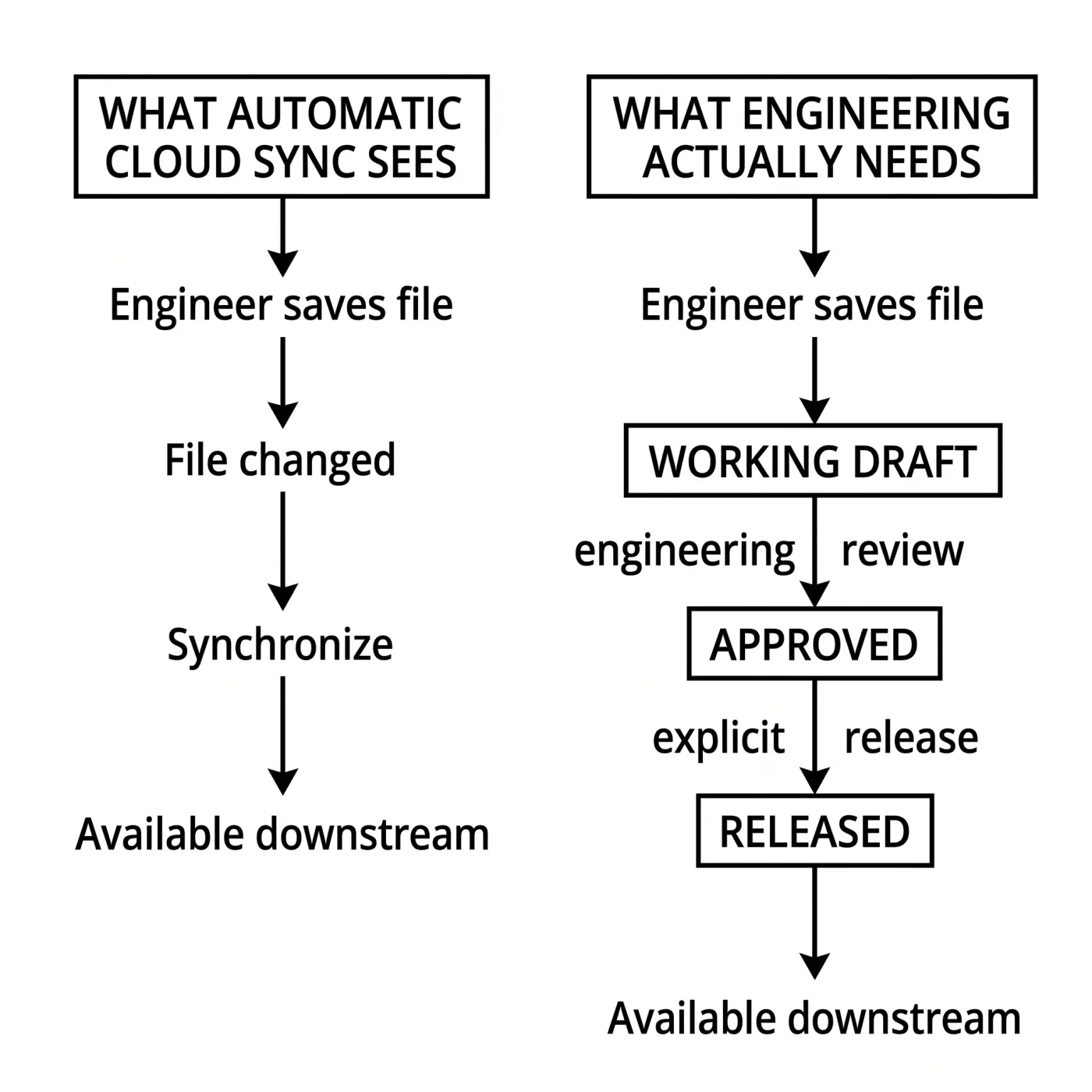
Avoiding that risk requires engineering teams to create an explicit release boundary between working designs and information approved for wider use.
If the underlying software cannot enforce that distinction, teams have to recreate it through manual processes. These can include:
Separate working and approved folders to prevent drafts from becoming operational references.
File naming conventions identifying preliminary and approved versions.
Permission rules restricting access to active engineering directories.
Manual copying or movement of files once a design has been approved.
Additional verification before downstream teams can rely on synchronized project information.
These workarounds create friction because automatic synchronization and engineering release control are solving different problems. Corporate IT needs files to be protected and available; engineering needs project information to become authoritative only when deliberately approved.
The solution is not necessarily less synchronization. Engineering workflows need a way to preserve automatic backup and accessibility while maintaining a controlled release process, where working designs remain clearly separated from the versions authorized for downstream decisions.
QUICK TAKE
To mitigate the risks inherent to generic software, teams can use specialized software where design context matters, preserve context between tools, and separate project visibility from authority.
Developers can reduce these risks of non-specialized software by applying three principles across their software stack.
Generic tools are most likely to create friction when the task depends on understanding what solar project data actually represents.
A markup application can display a tracker row without understanding that it is a design object. A spreadsheet can calculate a value without knowing whether the underlying engineering input is realistic. A cloud repository can synchronize a CAD file without knowing whether the design is ready for downstream use.
For workflows where these distinctions matter, prioritize domain-specific software that understands the objects, constraints, calculations, and relationships behind the project data.
Depending on the workflow, this means looking for tools that can:
Recognize project objects and constraints, rather than reducing designs to static images.
Incorporate engineering parameters and validation rules directly into calculations.
Maintain structured component and project data, reducing repeated manual entry.
Preserve relationships between project information, so changes can be understood in their engineering context.
Using specialized software does not eliminate friction if every transition between applications still depends on static exports, spreadsheets, and manual data entry.
The goal should therefore be integration without information loss.
When a layout moves into yield analysis or its outputs feed a financial model, teams should preserve as much of the underlying project context as possible. Otherwise, every handoff becomes another opportunity for data to become outdated, disconnected, or incorrectly interpreted.
Development teams should look for workflows that:
Reduce manual exports and re-entry between design, yield, and financial environments.
Keep downstream calculations connected to the correct project iteration.
Make changes traceable, so teams can understand which design and assumptions produced a particular result.
Reduce reconstruction between tools, particularly when repeated design changes require new yield or financial validation.
This is particularly important during iteration. Changing row pitch, equipment, tilt, or another design parameter can affect engineering, yield, and project economics simultaneously. If those disciplines operate on disconnected project states, teams spend additional time reconciling information before they can evaluate the next decision.
Making project information accessible does not automatically make it ready for use.
This distinction matters both when sharing projects externally and when distributing engineering information internally. Developers need to control who can see project information, what they can see, and whether the information they see is authoritative.
For external due diligence, that means allowing stakeholders to evaluate the information they need without unnecessarily exposing sensitive commercial data, internal comments, or preliminary iterations.
Internally, it means maintaining a clear boundary between working engineering data and approved project releases.
A robust information-management workflow should therefore:
Separate drafts from approved releases, rather than treating every synchronized save as authoritative.
Control access according to project context, not only folders and file locations.
Allow sensitive information to remain restricted while relevant technical information is shared.
Make approval status clear to procurement, commercial, construction, and other downstream teams.
Preserve a validated project state that stakeholders can confidently use for decisions.
General-purpose tools still have an important role in solar development. The risk appears when teams rely on them for workflows that require solar-specific engineering and project context.
Because generic software cannot understand that context, teams have to compensate through manual interpretation, spreadsheet logic, file transfers, permission structures, and additional verification. Across repeated project iterations and stakeholder handoffs, these workarounds increase the risk of outdated information, errors, delays, and unnecessary costs.
Modernizing a solar software stack is therefore not a matter of eliminating spreadsheets, PDFs, or cloud storage. To modernize their tool stack, developers must recognize where their capabilities end, and use specialized, interconnected software where project context matters.

Learn how an integrated solar platform can halve project development with seamless data transitions from site selection to design and yield estimation.