Blog
Virto CAD vs. PVcase Ground Mount: a technical comparison
April 10, 2026
PVcase Products

EXECUTIVE SUMMARY
Helios 3D and PVcase Ground Mount automate core utility-scale solar design. Ground Mount stands apart through broader AutoCAD compatibility, standards-based cable sizing, native AC- and DC-coupled BESS workflows, and connections to PVcase Prospect and PVcase Yield.
When engineering teams and developers compare Helios 3D alternatives, a feature checklist is the obvious place to start. Can the software place arrays automatically? Does it model terrain at the required fidelity? Can it automate electrical design and produce the documentation the project needs?
The checklist becomes less decisive when two platforms cover similar engineering ground. At that point, teams need to look at where each capability sits, what software and infrastructure support it, and how the design environment connects with the rest of project development.
This comparison examines all of the above using published documentation available in October 2026.
QUICK TAKE
Both tools support layout automation, terrain engineering, electrical workflows, and yield estimates, but their implementation and deliverables differ in ways.
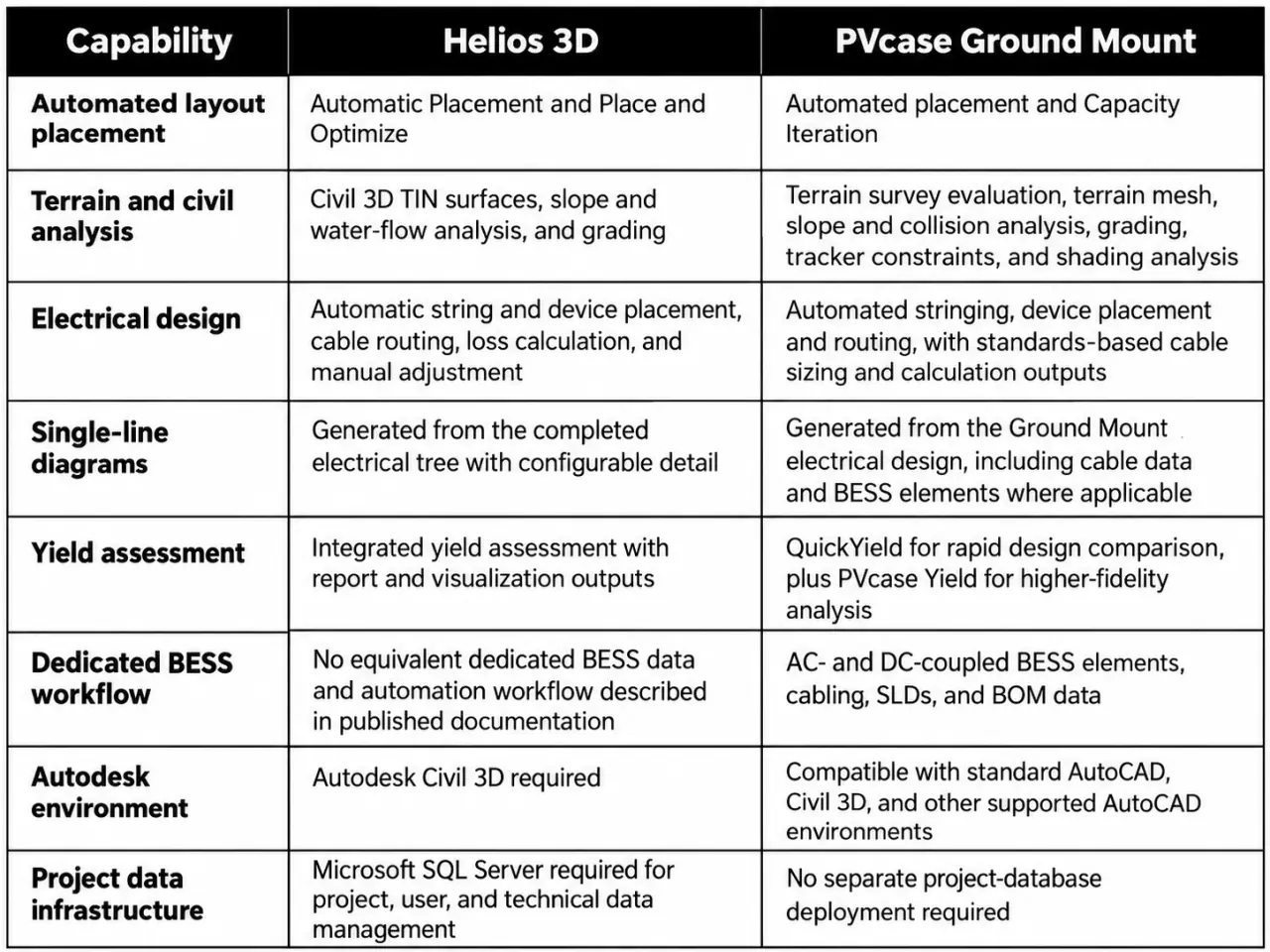
Both products automate array placement. Helios 3D's Automatic Placement and Place and Optimize functions recalculate layouts when placement parameters change. The field boundary only needs to change when the usable site boundary itself changes.
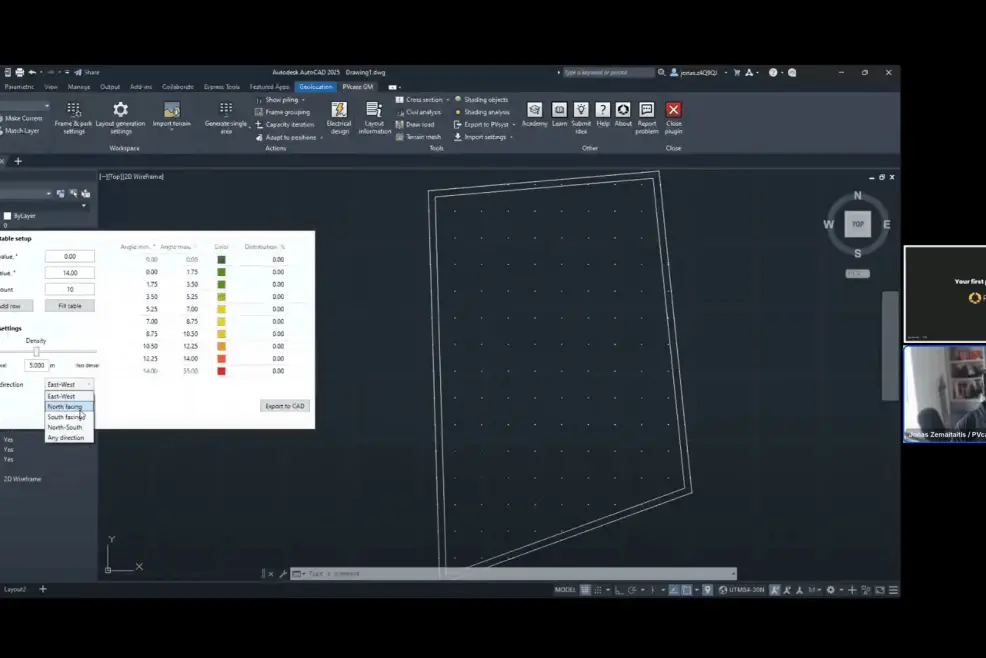
PVcase Ground Mount adds Capacity Iteration to evaluate combinations of pitch, ground coverage ratio, inner spacing, shading angle, and tilt. Engineers can pin promising options, return to the parameter ranges, and compare the resulting capacity and design metrics without rebuilding each scenario manually.
Helios 3D uses Civil 3D TIN surfaces and includes slope, water-flow, cross-section, and grading functions. It can retain detailed survey geometry or reduce the dataset when a project needs a different balance between terrain detail and processing demand.
PVcase Ground Mount brings terrain evaluation into the PV design workflow without requiring Civil 3D. Its tools support:
• Survey inspection: examine imported topography, identify survey-data problems, and locate difficult regions before layout generation.
• Civil constraints: test frames against project-specific slope, clearance, and pile-reveal criteria.
• Grading: create a proposed surface and report cut and fill volumes without overwriting the original topography.
The workflow also supports conventional and terrain-following trackers. Teams can test tracker-specific mechanical constraints, inspect terrain collisions, and compare how mounting strategy changes grading requirements. Shading analysis remains a separate design step, allowing engineers to test inter-row shading and selected 3D obstacles against the project location and sun position.
For difficult sites, the important advantage is control over the inputs. Engineers can bring in project survey data, verify how Ground Mount interprets it, and apply the actual slope, pile, clearance, tracker, and shading criteria that govern the design.
For more detail, see PVcase's guide to designing solar projects on complex terrain.
Helios 3D's Electric module automates string and device placement, cable routing, and electrical-loss calculation. It also allows engineers to adjust connections, MPPT allocation, devices, trenches, and cables after automatic placement. Its SLDs are generated from the completed electrical tree.
PVcase Ground Mount covers the same central design sequence and documents a more explicit standards-based cable-sizing workflow:
• Automate stringing, device placement, and DC and AC cable routing.
• Set voltage-drop limits and calculate recommended cable cross-sections using IEC 60364 and NEC 2020 methods.
• Account for installation method, grouping factors, soil resistivity, and short-circuit current limits.
Those calculations remain connected to the design outputs. Cable length, cross-section, and voltage-drop values appear in the electrical overview, SLDs, and bill of materials. Engineers can therefore move from layout to a reviewable electrical package without rebuilding cable calculations in a separate spreadsheet simply to populate the drawing outputs.
Helios 3D includes an integrated yield assessment that can use its electrical-layout data, weather inputs, and defined loss factors. Results can be produced in PDF or spreadsheet formats and displayed in its visualization environment.
PVcase separates rapid design feedback from detailed energy modeling. QuickYield runs within PVcase Ground Mount to compare layout scenarios in seconds. It uses the geometry, module and inverter parameters, and project weather data already available in the design. Its purpose is directional comparison, not final validation: it assumes flat terrain and uniform row spacing, considers row-to-row shading rather than other shading objects, and applies a bundled loss factor.
When a project needs component comparison, detailed losses, complex shading, or financial and bankable reporting, teams can export the selected layouts to PVcase Yield. This two-level workflow keeps early iteration fast while preserving a direct path into higher-fidelity modeling.
QUICK TAKE
Beyond shared design functions, native storage modeling, software prerequisites, data infrastructure, and upstream and downstream product connections create meaningful differences.
PVcase Ground Mount has a documented advantage for hybrid projects: dedicated AC- and DC-coupled battery energy storage workflows inside the PV design environment.
Engineers can add BESS elements with defined power and capacity, assign them to transformers or central inverters, generate the relevant AC or DC cabling, and include the system in electrical overviews. BESS elements and their cable connections also flow into SLDs and bills of materials, including cable lengths, voltage drop, and cable cross-sections where those calculations are enabled.
Helios 3D's published documentation does not describe an equivalent native BESS data and automation workflow. Because it runs in Civil 3D, storage geometry can remain in the same drawing. The difference is what the software understands and automates: PVcase Ground Mount treats storage as part of the electrical system and carries its data into project outputs.
For solar-only portfolios, this distinction may not drive the decision. For teams delivering co-located PV and storage, it removes manual definition from a growing part of the project scope. PVcase explains the system choices in its guide to AC- and DC-coupled BESS design.
The two products place different requirements around the design application.
Helios 3D runs in Autodesk Civil 3D and requires Microsoft SQL Server, including for a local installation. The database supports centralized management of projects, users, permissions, and the technical data associated with components such as modules, racks, cables, inverters, and transformers. Organizations can deploy it on one workstation or configure a shared network environment for multiple users and offices.
That centralized architecture introduces product-specific administration requirements for network deployment:
• SQL access, user permissions, and firewall configuration.
• Shared paths, backups, updates, and client connectivity.
• IT configuration aligned with the organization’s security and network settings, as stated in Helios 3D installation documentation.
These requirements do not establish higher total cost on their own, but they add an infrastructure layer that must be provisioned and maintained.
PVcase Ground Mount runs in standard AutoCAD and is also compatible with AutoCAD Electrical, AutoCAD Mechanical, AutoCAD MEP, and Civil 3D. Its published system requirements do not specify a separate SQL project database. For organizations whose designers already work in standard AutoCAD, PVcase Ground Mount avoids making Civil 3D and a Helios-specific SQL environment prerequisites for utility-scale PV design.
The practical distinction is straightforward. Helios 3D centralizes project and technical data through Civil 3D and SQL Server. PVcase Ground Mount keeps the core design workflow inside a wider choice of AutoCAD environments with fewer documented product-specific infrastructure components.
Teams comparing the broader category can review the selection criteria in PVcase's guide to AutoCAD-based solar design.
PVcase Ground Mount is part of the PVcase product suite, which extends beyond detailed design. PVcase Prospect supports site selection and early feasibility, PVcase Ground Mount develops the plant design, and PVcase Yield provides detailed energy modeling.
The connection from site selection to design uses a dedicated PVcase export rather than a generic shapefile workflow. PVcase Prospect can package site boundaries, constraints or buildable area, and high-resolution terrain data for import into PVcase Ground Mount. Ground Mount recognizes the file structure, allowing the design team to begin with the site information already assembled upstream instead of manually reorganizing separate layers for CAD.
The downstream connection follows the same principle. Engineers can send individual layouts or selected Capacity Iteration scenarios from PVcase Ground Mount to PVcase Yield, where layouts can be tested with different modules, inverters, weather sources, and simulation assumptions.
Helios 3D covers a broad design-and-engineering scope inside its own environment, including civil, electrical, yield, project-management, reporting, and visualization functions. Its published product scope does not describe a first-party parcel-screening product upstream of design or a separate high-fidelity energy-modeling product connected through the same vendor workflow.
For developers aligning prospecting, engineering, and energy analysis, these handoffs help address three common forms of software fragmentation:
• Duplicated data entry across project stages.
• Brittle file conversions between disconnected tools.
• Version mismatches as project data moves between systems.
Each PVcase product retains a defined role while data moves through a documented first-party workflow.
QUICK TAKE
The best fit depends on existing CAD and IT environments, hybrid project needs, electrical documentation requirements, and cross-stage workflows today.
The right evaluation starts with the environment and project mix the engineering organization needs to support.
Already use Autodesk Civil 3D as their standard solar and civil-engineering environment.
Want SQL-based central management of projects, permissions, and technical component data.
Have the IT capacity to configure and maintain the required local or network database environment.
Prioritize detailed civil, electrical, yield, and visualization functions within the Helios 3D environment.
Want utility-scale PV design automation in standard AutoCAD without making Civil 3D a prerequisite.
Do not want to deploy and administer a separate SQL project database for the design product.
Need standards-based cable sizing connected to electrical drawings and bills of materials.
Design AC- or DC-coupled PV-plus-storage projects that benefit from native BESS data, cabling, SLD, and BOM workflows.
Want a defined path from site screening in PVcase Prospect through design in PVcase Ground Mount and detailed analysis in PVcase Yield.
Teams without existing Civil 3D expertise should include Civil 3D training and workflow familiarity when evaluating Helios 3D. Teams already standardized on Civil 3D may place less weight on that requirement. Either way, the comparison should use representative site surveys, tracker rules, electrical configurations, output standards, and collaboration requirements rather than a generic feature score.
For organizations starting from standard AutoCAD, expanding into hybrid projects, or connecting engineering with adjacent development stages, PVcase Ground Mount presents the stronger operating model.
Helios 3D and PVcase Ground Mount both cover the core tasks of utility-scale PV design. One operates within a Civil 3D and SQL-based environment; the other supports a broader range of AutoCAD environments.
As we've seen, a feature checklist alone isn't enough to determine which solution is the better fit. Engineering teams and developers need to look beyond the boundaries of the design application and ask themselves:
What other tools will we need? Does the software cover our broader development needs, from site selection and preliminary design to detailed engineering and energy modeling?
How will these tools work together? Can project data move between development stages without repeated manual transfers, conversions, or rework?
What happens to our data along the way? Can we maintain consistency and traceability across the project lifecycle, reducing the risks of duplicated information, outdated versions, and disconnected datasets?
Compare PVcase and Helios 3D and assess which workflow better fits your engineering environment.